
Shopify vs Bluehost is a confusing matchup because they’re not really the same kind of product. Shopify is a hosted, all-in-one platform built to sell online; Bluehost is web hosting you pair with WordPress to build almost any site. Pick the wrong one and you’ll fight your platform for months. Here’s the honest breakdown — features, real pricing, SEO — and which one actually fits you.
IN THIS GUIDE
The 30-second verdict
If you want a store up and running quickly with no coding, Shopify is the clear winner — it’s built purely for selling. If you want flexibility for a blog, a content site, or a custom project where a store is only one part, Bluehost with WordPress is the stronger choice. Here’s the quick version:
| Shopify | Bluehost | |
|---|---|---|
| What it is | Hosted ecommerce platform | Web hosting for WordPress |
| Best for | Selling online, fast | Blogs, content sites, flexible projects |
| Ecommerce | Built in, out of the box | Add WooCommerce yourself |
| Hosting + SSL | Included | It is the hosting (SSL included) |
| Ease of use | Drag-and-drop, no coding | Easy host, store needs more setup |
| SEO | Built-in tools | More powerful via plugins (Yoast) |
| Starting price | ~$39/mo all-in | A few $/mo intro, rises on renewal |
| Free domain | Add separately | Yes (year one) |
Shopify: built to sell online
Shopify was built purely for ecommerce, and it shows. Everything you need to sell is included right out of the box: product management, inventory, order processing, payment gateways, discount codes, and marketing tools. You design your store with drag-and-drop editing — no coding — and the themes are professional and made for selling. It also handles the things most people forget: multilingual stores, accelerated checkout, and even POS for in-person sales. Hosting and SSL are part of the subscription, so there’s nothing to set up separately.
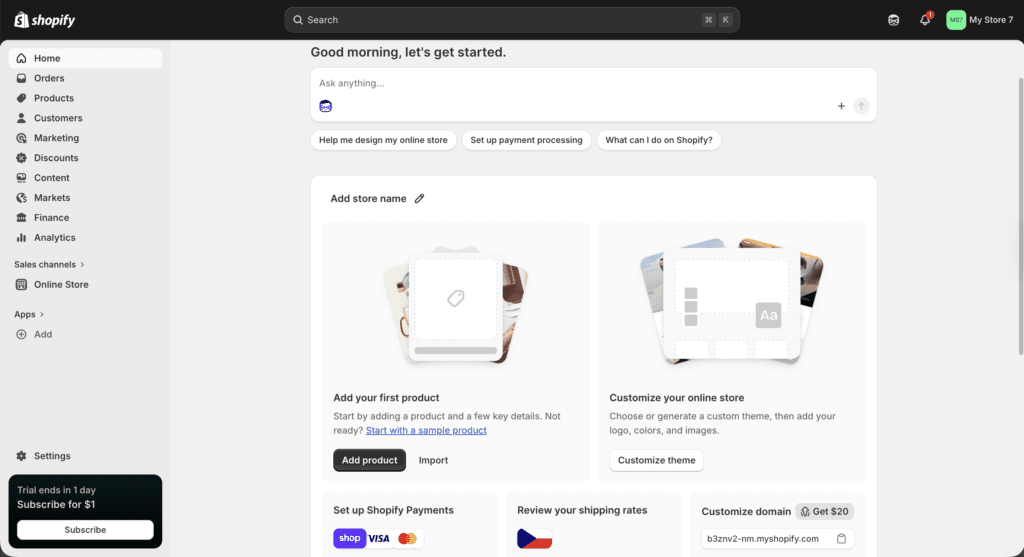
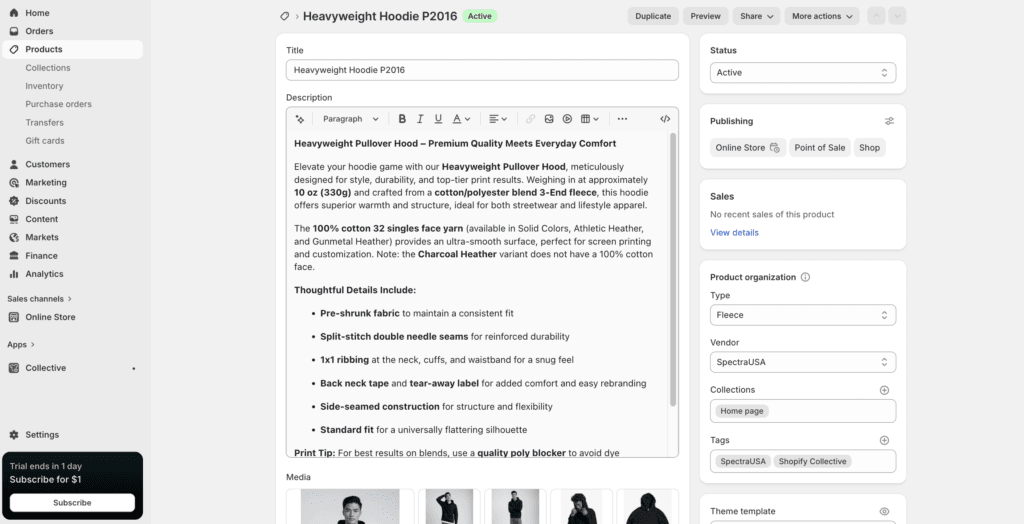
Because it’s purpose-built, the selling features feel native rather than bolted on. Inventory, variants, and order management are all there on day one, even on the entry plan — the kind of setup you’d otherwise assemble yourself on a host like Bluehost.
Try Shopify for $1/month
Start on Basic and build your store with the full ecommerce toolkit — 3 days free, then $1/month for 3 months.
Bluehost: built to host any website
Bluehost is a hosting platform built for all kinds of websites — blogs, business sites, portfolios, and online stores too. It’s officially recommended by WordPress, so it integrates smoothly: you get one-click WordPress install, automatic updates, and 24/7 support by chat, phone, and email. Uptime and speed are strong, which matters for SEO. If you want the freedom to build any kind of site — not just a store — and grow into ecommerce later, Bluehost gives you that flexibility.

Right now you can get up to 78% off your first Bluehost plan plus a free domain through the link — the best current Bluehost discount, and far cheaper than the homepage price. If you’ve already settled on hosting and just want the best one, see my Hostinger vs Bluehost comparison too.
Get the Bluehost deal
Beginner-friendly WordPress hosting with a free domain for year one — up to 78% off through the link.
Shopify vs WooCommerce: the real ecommerce question
Here’s the key thing most people miss: Bluehost doesn’t have its own store builder. To actually sell, you add WooCommerce — the free, open-source ecommerce plugin for WordPress. So “Shopify vs Bluehost for selling” is really Shopify vs WooCommerce: an all-in-one platform versus a flexible plugin you assemble and maintain yourself. WooCommerce is powerful and endlessly customizable, but it’s more technical — you handle the plugins, payment setup, security, and updates. Shopify trades some of that flexibility for a store that just works out of the box. If you already know WordPress, WooCommerce on Bluehost is a great fit; if you’d rather not manage a stack, Shopify is the smoother path. (Building on WordPress either way? My Shopify vs WordPress guide goes deeper on that side.)
Pricing: what you really pay
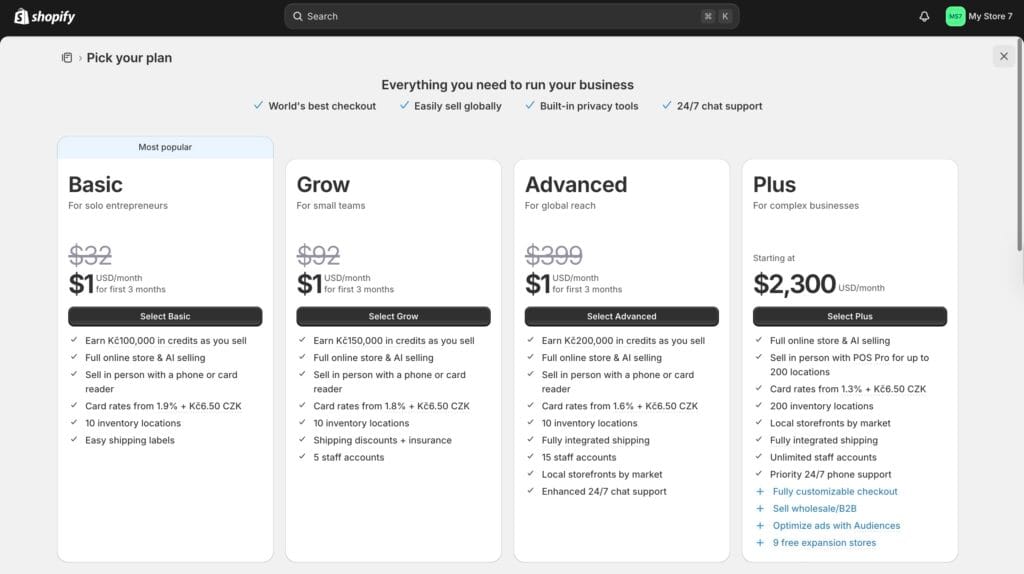
Bluehost starts at just a few dollars per month, which looks far cheaper — but the sticker price hides the real cost. Those intro rates rise sharply on renewal, and extras like premium themes, ecommerce plugins, or paid SSL can add up. Shopify starts at around $39 per month, but that includes hosting, SSL, and the full ecommerce toolkit in one predictable subscription. It looks pricier up front, yet once you add everything a real store needs, the gap narrows — and if selling online is the goal, Shopify is often the better value. You can see every tier in my Shopify pricing plans breakdown.
SEO and which to choose
For SEO, Shopify has the essentials built in — custom URLs, meta descriptions, and image alt tags — so you can optimize without installing anything. Bluehost paired with WordPress can be more powerful thanks to plugins like Yoast SEO, but it takes more setup and know-how. So which is better, Shopify or Bluehost? If you want a store live quickly with no coding, Shopify is the clear winner. If you want more flexibility — especially for blogs or other custom sites — Bluehost with WordPress is the stronger choice. The right answer is simply whichever matches what you’re building.
Which one I’d actually pick
If I were starting a serious ecommerce business, especially with paid ads, I would definitely pick Shopify — it has most of the e-commerce features already built-in, so there is usually no need to install third-party plugins, while with Bluehost and WordPress you’d need to also install an ecommerce plugin like WooCommerce, and then many separate add-ons.
Running an ecommerce website on Bluehost might still be for you if you want to prioritize organic traffic, such as from search engines, and need more control.
What I personally like about Shopify is the fact that you have everything from billing to payments from customers in one place, which cannot be said about WooCommerce.
Shopify vs Bluehost: the verdict
So, Shopify or Bluehost? If your goal is to sell online and you want a store up and running fast with no technical overhead, Shopify is the clear pick — it’s built for selling, and everything you need is included. If you want flexibility for a blog or content site where a store is secondary, or you already know WordPress, Bluehost is the stronger, more versatile choice. They’re different tools for different jobs, so match the platform to what you’re building. If selling is the plan, the cheapest way to test Shopify is the Shopify free trial — 3 days free, then $1/month for 3 months.
Start your store on Shopify
3 days free, then $1/month for 3 months — sell online without the setup.
Frequently asked questions
Is Shopify or Bluehost better?
They’re built for different jobs. Shopify is better if your main goal is selling online with no technical setup. Bluehost is better for blogs, content sites, and flexible WordPress projects where a store is only one part of the picture.
Can you build an online store on Bluehost?
Yes, by adding WooCommerce, the free ecommerce plugin for WordPress. Bluehost even sells WooCommerce-ready plans. It works well for small or content-led stores, but it’s more hands-on than Shopify — you manage the plugins, updates, and setup yourself.
Is Shopify more expensive than Bluehost?
On sticker price, Bluehost is cheaper to start. But Shopify’s roughly $39/month is all-in (hosting, SSL, and the full ecommerce engine), while Bluehost’s low intro price rises sharply on renewal and you pay separately for themes, plugins, and ecommerce extras. Compare total cost, not the headline number.
Do you need separate hosting with Shopify?
No. Shopify is fully hosted and includes hosting and an SSL certificate in the subscription. With Bluehost, the hosting is what you’re buying — you then build the site (and add a store) on top of it yourself.
Which is better for SEO, Shopify or Bluehost?
Shopify has solid SEO tools built in — custom URLs, meta descriptions, and alt tags. Bluehost with WordPress can go further thanks to plugins like Yoast SEO, but it takes more setup and know-how. Shopify is easier out of the box; WordPress has a higher ceiling for those willing to configure it.
Related next step
Next: browse more Shopify guides, or check the current software deals.