This Privacy Bee tutorial shows exactly how the service works — run the free scan, read your dashboard, and get your personal data removed from data brokers — using screenshots from a real paid account so you can judge it before paying. Short version: the scan is genuinely free and worth running; the removals are the paid part.
Privacy Bee deal
Run the free exposure scan, then get 62% off your first year through the link.
What Privacy Bee actually does (and who it’s for)
Privacy Bee is a data-removal service. It finds where your personal information — name, address, phone number, family details, even income estimates — is being held and sold by data brokers and people-search sites, submits removal requests on your behalf, and keeps re-checking so the data stays down. It’s built for people who’ve searched their own name and didn’t like what came back: anyone who wants their home address and phone number off the internet, has a public-facing job, or has dealt with spam, scams, doxxing, or harassment. If none of that sounds like you, a free tool or a cheaper competitor may be enough — more on that below.
Before you start: what you need
You don’t need much to begin. The free exposure scan asks only for a few basic details — your name and email — and runs without a credit card, so there’s no commitment to see your results. Two honest caveats first:
- There’s no free trial. Privacy Bee gives you a free scan and dashboard, but the actual broker removals sit behind a paid plan.
- Coverage is strongest in the US. It leans on privacy laws like the CCPA and GDPR, but outside the US you may see fewer results.
Keep expectations realistic: no service removes everything instantly, and what shows up depends on you and where you live.
How to use Privacy Bee, step by step
1. Run the free exposure scan (no credit card)
Go to Privacy Bee and start the free scan. You enter a few basic details — name and email — and within a few seconds it turns a simple lookup into a full dashboard showing where you’re exposed and how serious it is. This is the step that makes it real: instead of vaguely worrying about your data, you’re looking at it. No card is required to get this far.
2. Read your privacy dashboard
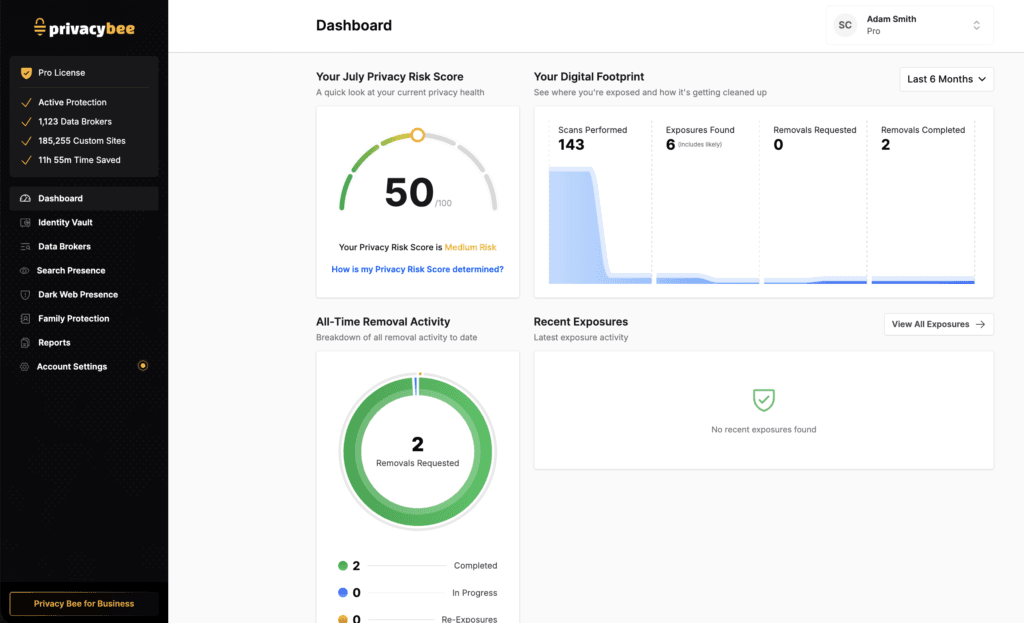
The dashboard is your control center. At the top sits your Privacy Risk Score — a single number out of 100 summarising how exposed you are, labelled low, medium, or high risk. Next to it, your Digital Footprint shows how many scans have run, how many exposures were found, and how many removals have been requested and completed. In the account below the score is 50/100 (medium risk), with 143 scans performed, 6 exposures found, and 2 removals completed — plus a running tally of time saved versus doing this by hand.
3. Check the data broker list and removals
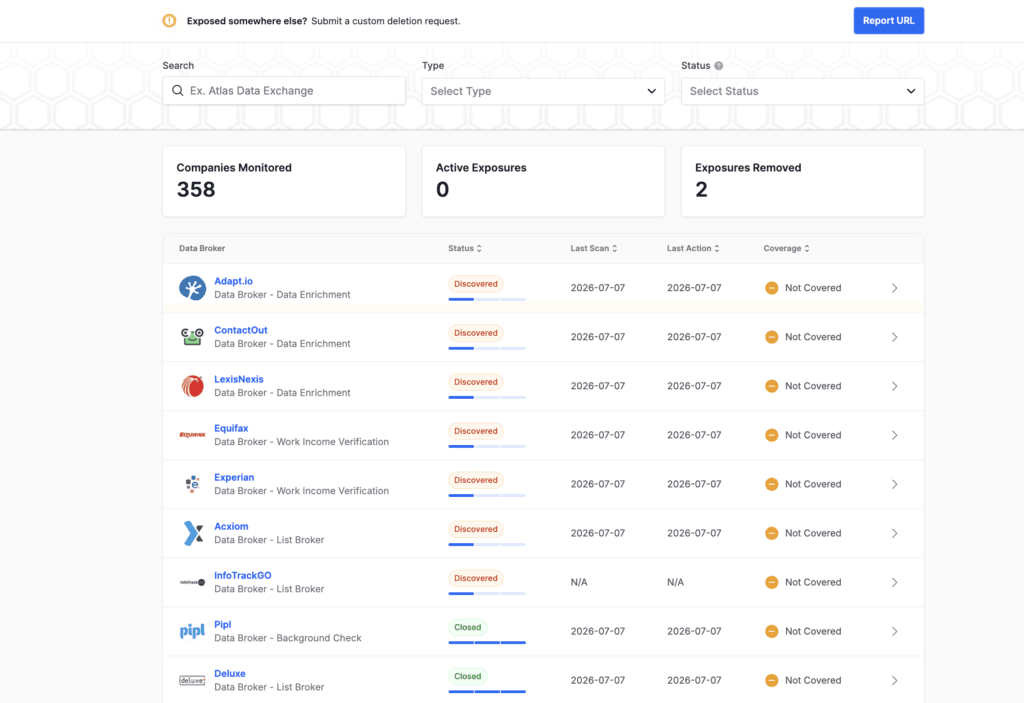
Open the Data Brokers section and you can see the actual companies holding your information — names you’ll recognise like Equifax, Experian, LexisNexis, and Acxiom, alongside people-search and data-enrichment firms. Each row shows a status (for example Discovered or Closed), when it was last scanned, and whether it’s covered by your plan. When Privacy Bee finds your data on a broker, it submits a removal request for you — and these are proof-based: instead of just telling you it’s handled, it documents that a request went out and was completed. Data brokers are legally required to honour opt-out requests under laws like the CCPA and GDPR, which is what gives the requests teeth.
4. Fill in your Identity Vault
Before Privacy Bee can protect you, it needs to know what to look for. That happens in the Identity Vault, where you add the details you want monitored and removed — name, emails, home address — all stored encrypted. You’re in control of what goes in, and the more accurate the information, the better it can match your exposures and send the right removal requests. It takes a couple of minutes, and then the system has what it needs to work.
5. Turn on ongoing monitoring
Removal isn’t one-and-done, because brokers re-collect your data over time — clean everything today and it can quietly reappear within weeks. Privacy Bee keeps re-scanning and resubmitting on a schedule so your information stays down. You also get monitoring across search engines, the dark web, and paste sites, so if your details surface somewhere new, you find out. Think of it less like a single cleanup and more like protection running in the background.
Privacy Bee pricing and the current offer
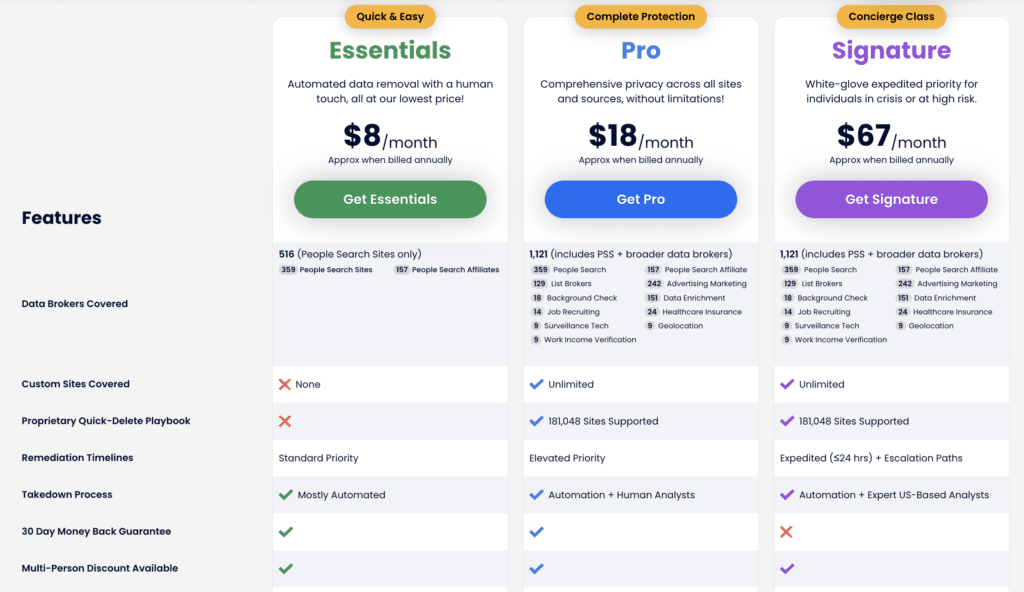
Privacy Bee runs three plans, billed annually (approximate monthly costs shown here). The free scan is separate — you can see your exposure without choosing a plan at all.
| Plan | Approx. price | Best for | Coverage |
|---|---|---|---|
| Essentials | ~$8/mo | Lowest cost, mostly automated | 516 people-search sites only; no custom sites |
| Pro | ~$18/mo | Full removal for most people | 1,121 brokers + unlimited custom sites |
| Signature | ~$67/mo | High-risk, expedited | 1,121 brokers + expedited (≤24h) + US analysts |
A few honest notes: the entry Essentials tier only covers people-search sites (around 516), not the full broker network — the wider data-broker removal really starts at Pro. The 30-day money-back guarantee applies to Essentials and Pro but not Signature. On the offer: because this post is a paid partnership, the link below has my promo code GXCCB9RK applied automatically — currently 62% off your first year. You don’t have to use it to run the free scan.
Privacy Bee pros and cons
Pros
- Genuinely free exposure scan, no credit card
- Wide coverage: 1,100+ brokers plus a large set of custom sites (Privacy Bee’s figures)
- Proof-based removals you can verify in the dashboard
- Ongoing re-scans plus search, dark web, and paste-site monitoring
- PCMag Editor’s Choice (2024 and 2025); US-based 24/7 security team
Cons
- Premium price — costs more than several competitors
- Removals are locked behind a paid plan (the scan alone removes nothing)
- Entry Essentials tier only covers people-search sites
- Coverage is US-weighted; thinner results outside the US
- Nothing is instant, and your score never truly hits zero
The part most tutorials skip
I ran the free scan before committing to anything — it only asked for my name and email, no card — and the results came back in under a minute. What caught me off guard was how much of my data was already exposed; seeing it laid out is very different from vaguely knowing it’s “out there.” My Privacy Risk Score landed at 50/100 (medium risk), with 6 exposures found and 2 removals already completed.
Filling in the Identity Vault took me about two to five minutes — name, emails, home address — and it’s worth doing properly, because the more accurate it is, the better it matches your exposures. Over the next few days the change I cared about showed up: my risk score started dropping — not instantly, but visibly.
If you’re new to this, my one piece of advice is simple: run the free scan first. It costs nothing, needs no card, and that first look tells you whether paying is even worth it for you.
See where your data is exposed — free
Run Privacy Bee’s free scan first — no credit card — then decide if the removals are worth paying for.
Who should actually use Privacy Bee?
Use Privacy Bee if you want a hands-off way to get your personal details off data brokers and keep them off, and you’re okay paying a premium for the convenience and the ongoing monitoring. The Pro plan is the realistic starting point for most people, since Essentials only touches people-search sites. It’s an especially easy call if you’re in the US, have a public-facing role, or have dealt with doxxing or scams.
Start cheaper, or skip it, if you’re outside the US (results will be thinner), if you only want a quick look (run the free scan and stop there), or if budget is tight — a cheaper competitor like Incogni covers the essentials for less. You can also do all of this manually for free; it just takes a lot of tedious, repetitive work that never really ends.
Get 62% off Privacy Bee
The promo code applies automatically at checkout — 62% off your first year for new customers.
Frequently asked questions
Is Privacy Bee free?
The exposure scan and dashboard are free, with no credit card required, so you can see where your data is exposed at no cost. Actually removing your data from brokers requires a paid plan.
Does Privacy Bee have a free trial?
No. Privacy Bee doesn’t offer a free trial. You get a free scan to check your exposure, and paid plans come with a 30-day money-back guarantee on Essentials and Pro, which is the closest thing to trying it risk-free.
How long does Privacy Bee take to remove your data?
It’s not instant. You’ll see some quick wins, but some brokers take weeks or months to respond, so Privacy Bee follows up and re-scans on a schedule. Removal is ongoing rather than one-and-done, because brokers re-list your data over time.
Does Privacy Bee work outside the US?
It can, using privacy laws like the GDPR, but coverage is strongest in the US. If you’re outside the US, expect fewer exposures found and removed, so run the free scan first to see what it actually finds for you.
Is Privacy Bee worth it?
It’s worth it if you want a set-and-forget way to remove your personal data and keep it down, and you’re fine with a premium price — the Pro plan suits most people. If you’re on a budget or outside the US, a cheaper alternative or the free scan alone may be enough.
Related next step
Next: browse more VPN and privacy guides, or compare cheaper options on the current tool deals.