To watch American Netflix from abroad, install a VPN that still beats Netflix’s blocks, connect to a US server, then open Netflix — the US library loads in seconds. NordVPN is the most reliable pick for this, but the setup is the same whichever VPN you use.
What you need before you start
Two things: a Netflix account, and a VPN that can still get past Netflix’s VPN detection. Netflix shows a different catalogue in every country because of licensing deals, so from outside the US you only see your local library (or a proxy error if you’re already on a flagged connection). A VPN gives you a US IP address, and Netflix loads the American catalogue as if you were sitting in the States.
The catch: most VPNs are blocked by Netflix on sight, so the provider you pick matters more than the steps. Here’s the setup that works.
How to watch American Netflix from abroad (step by step)
Step 1 — Get a VPN that unblocks US Netflix
You need one with streaming-optimised US servers. NordVPN is the most consistent for American Netflix — its SmartPlay feature handles the unblocking automatically across 7,000+ servers, so you don’t change a single setting. Surfshark is the cheaper alternative if you want unlimited devices on one account. Skip free VPNs for this; here’s why further down.
Step 2 — Install the app and sign in
Download the app for your device — Windows, Mac, iPhone, Android, or a Fire TV Stick — and log in. If you’re setting it up on a TV, install the app from your device’s store the same way you’d add any other.
Step 3 — Connect to a US server
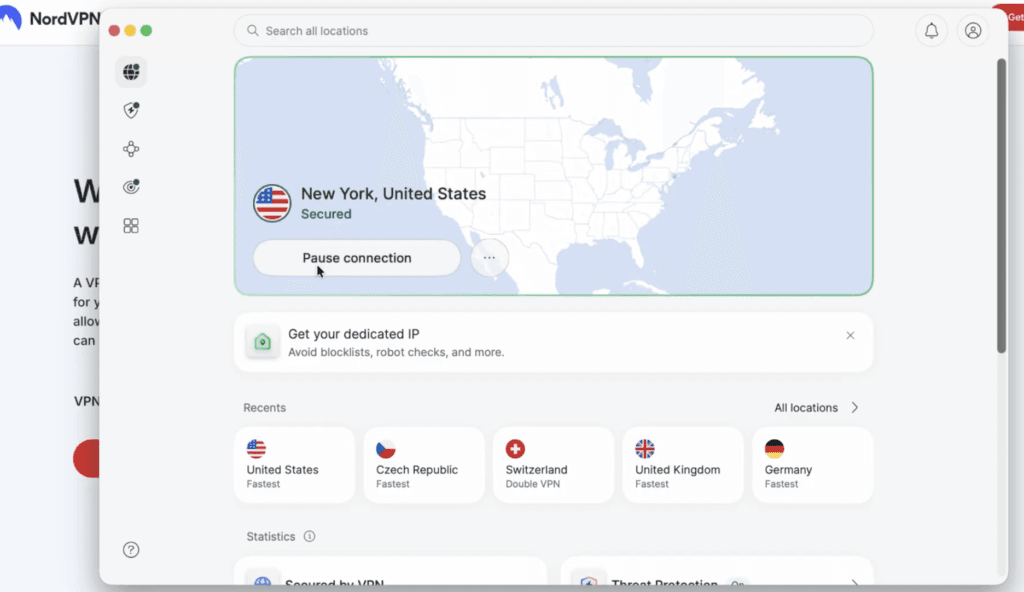
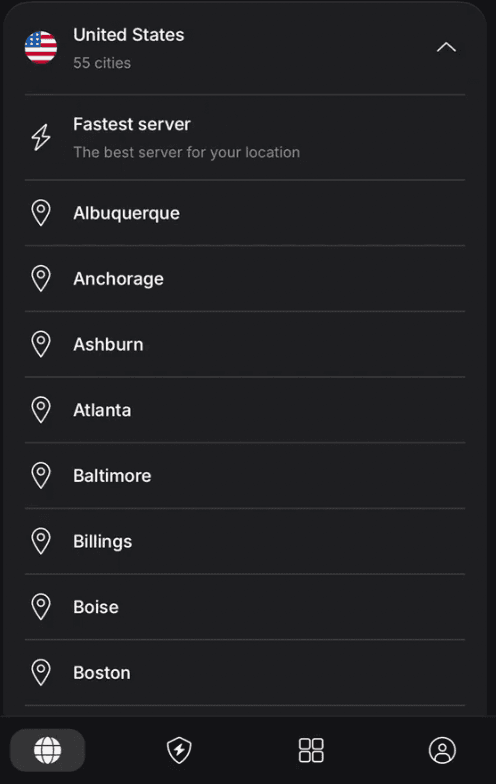
Open the app and connect to a server in the United States. Any US city works for the main US library — pick one geographically close to you for better speed. Wait until the status reads connected before you do anything else.
Step 4 — Open Netflix and refresh
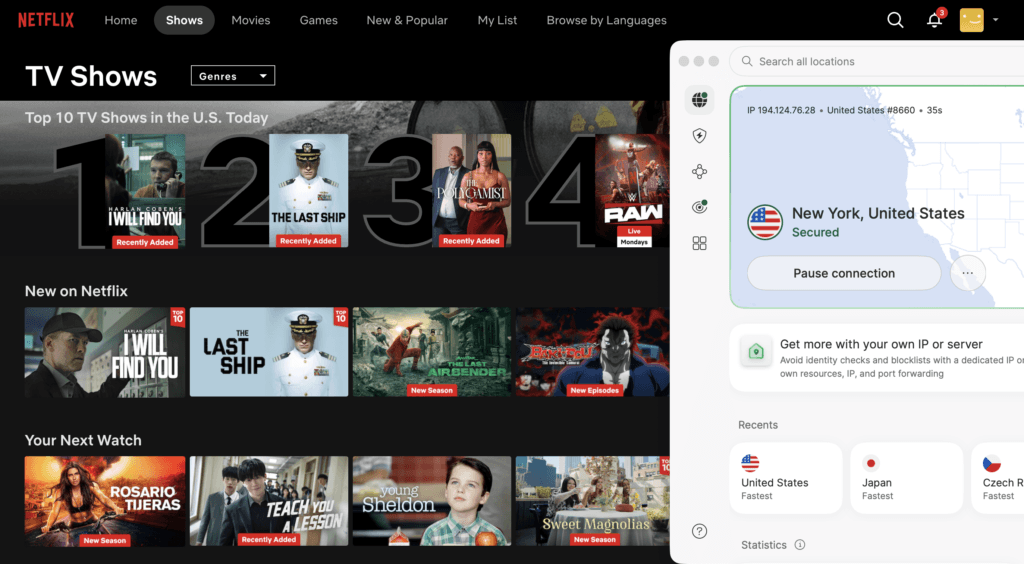
Now open Netflix in your browser or app. If you were already signed in, refresh the page (or close and reopen the app) so Netflix re-checks your location. You should now see the US catalogue — US-only titles that weren’t there before are the proof it worked.
Step 5 — Hit a block? Switch US servers
If Netflix throws a proxy error instead of the US library, don’t panic — it just means that one server’s IP is flagged. Disconnect, connect to a different US server, and reload. That alone fixes it most of the time. The next section covers the rest.
Why Netflix blocks VPNs (and how to fix the proxy error)
Netflix licenses shows country by country, so it actively detects and blocks VPN traffic. When it catches one, you get the m7111 “you seem to be using an unblocker or proxy” error. Work through these in order:
- Switch to a different US server — the fastest fix; a big network like NordVPN’s just rotates you to a clean IP.
- Clear your browser cache and cookies (or delete and reinstall the Netflix app) so old location data doesn’t leak.
- Log out of Netflix, then log back in while the VPN is connected.
- Use the Netflix app or a fresh private browser window instead of a tab full of stale cookies.
- Avoid free VPNs — their handful of shared IPs are already on Netflix’s blocklist.
The part most tutorials skip
I set this up on my laptop first. Opened NordVPN, picked a US city — New York — and waited for it to say Secured, which took maybe five seconds. Then I refreshed Netflix and the catalogue just swapped: a whole row of US-only titles I don’t get at home, like The Polygamist. SmartPlay did the work, so I never touched a setting. I did hit the proxy error once on the first server I tried — that m7111 message — but disconnecting and reconnecting to a different US city cleared it instantly. With 7,000-odd servers there’s always another to jump to.
Speed-wise I lost a little, but it streamed in HD without buffering. If you’re new to this, the one thing I’d say: don’t waste time on a free VPN for Netflix, and if you see that proxy error, don’t assume it’s broken — just switch US servers and reload.
Get the NordVPN deal
The VPN I use to unblock US Netflix — fast enough for 4K, and SmartPlay clears the blocks automatically. Use code YTSTACK at checkout for the current deal.
Which VPN should you use for American Netflix?
All three VPNs from the video unblock Netflix, but they’re not equal for this job.
NordVPN — the safest pick. It unblocks US Netflix the most consistently, SmartPlay does the work for you, and it’s fast enough for 4K. Currently up to 76% off plus 4 months free with code YTSTACK.
Surfshark — the value pick. Same streaming ability, unlimited devices on one account (good for a whole household), and usually cheaper — currently up to 86% off plus 4 months free, also with code YTSTACK. Grab the Surfshark deal if price and device count matter most.
ProtonVPN free — honest answer: not for this. The free tier doesn’t reliably unblock Netflix and limits your server choice, so it’s fine for trying a VPN but not for streaming the US library. If you’re weighing the paid plans, see our Surfshark vs ProtonVPN breakdown.
Unblock the US Netflix library from anywhere
Set NordVPN to a US server and your American shows travel with you. Use code YTSTACK for the current deal.
Frequently asked questions
Is it legal to watch American Netflix from abroad with a VPN?
In most countries using a VPN is legal, and watching Netflix you already pay for isn’t a crime. It does break Netflix’s terms of service, which ban VPNs and proxies — but in practice Netflix blocks the connection rather than penalising accounts, and there’s no public record of bans for it. Check your local rules, since a few countries restrict VPN use.
Why does Netflix say I’m using a proxy, and how do I fix it?
That’s the m7111 proxy error — Netflix flagged your server’s IP as a VPN. Connect to a different US server, clear your browser cache and cookies (or reinstall the Netflix app), and log out and back in while connected. A VPN with a large US network like NordVPN simply rotates you to a fresh IP.
Does a free VPN work for American Netflix?
Rarely, and not reliably. Free tiers — including ProtonVPN’s — usually block streaming or get detected within hours, and they cap speed so you can’t watch in HD. For consistent US Netflix access you need a paid VPN with streaming-optimised servers.
Will a VPN slow down my Netflix streaming?
A little — encryption always costs some speed. But a fast VPN on a nearby US server keeps plenty of headroom for HD and 4K. NordVPN’s NordLynx protocol loses only a small fraction of speed, so stalling usually comes from a distant or overloaded server. Switch to a closer US server if it buffers.
Can I watch US Netflix on my smart TV or Firestick this way?
Yes. Install the VPN app on a Fire TV Stick or Android TV, connect to a US server, and open Netflix. For TVs without VPN apps, NordVPN’s SmartPlay (SmartDNS) routes streaming traffic so you still get the US library, or you can set the VPN up on your router.
Related next step
Next: browse our other VPN guides, see whether NordVPN holds up for gaming, or check the current VPN deals.