To use Incogni, you pick a plan, add your name and contact details, sign one authorization form, and let it send removal requests to data brokers automatically — then track progress from the dashboard. Below is the full setup, what each dashboard score means, and how to claim the current discount.
What you’ll set up with Incogni
Incogni is a data-removal service from the Surfshark team (now part of the NordVPN family). You give it your details, sign one form, and it spends the following weeks and months sending legally-backed opt-out requests to data brokers and people-search sites on your behalf. The setup takes a few minutes; the removals then run in the background for as long as you’re subscribed.
Here’s the whole process, start to finish: choose a plan, create your account, add your name, emails and addresses, sign the authorization form, then use the dashboard to watch removals land and read each broker’s compliance and severity scores.
Get the Incogni deal
Make data brokers delete your personal info — on autopilot. Currently up to 60% off an annual plan with code YTSTACK.
Before you start
You’ll need about five minutes and three things: an Incogni subscription (there’s no free trial, but every plan has a 30-day money-back guarantee), the personal details you want scrubbed (name, emails, home addresses, phone — up to three of each), and a primary email you actually use, since that’s what Incogni matches against broker records. Incogni covers users in the US, UK, EU, Canada and a few other countries — if you’re outside those, check coverage before you pay.
How to use Incogni, step by step
Step 1: Choose a plan and create your account
On the pricing page, pick Standard (automated removal from 400+ brokers — enough for most people), Unlimited (adds custom removals from sites outside the core list), or a Family plan for up to five people. Annual billing is roughly half the monthly price. If you sign up through the Incogni deal, the discount applies through the link or with code YTSTACK at checkout — here’s what that looks like on an annual plan:
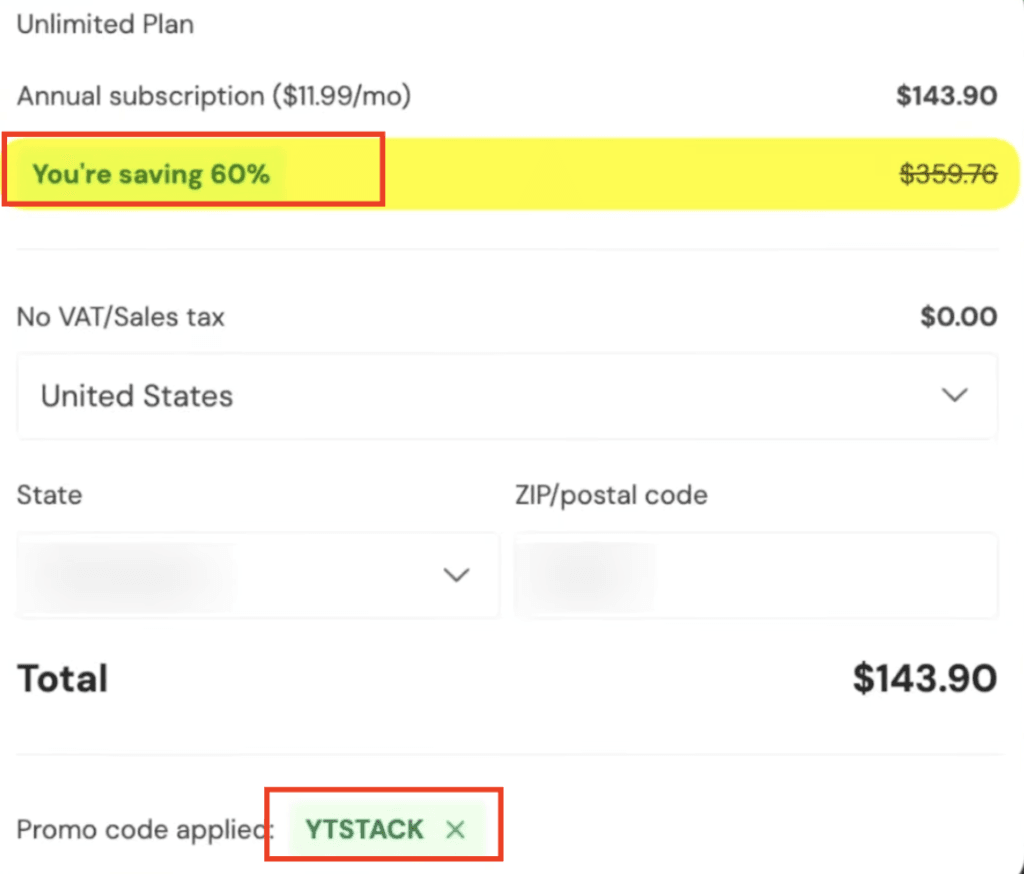
One honest caveat: the discount is first-year pricing, so it renews at the standard rate. Note your renewal date if you only want the cheap year.
Step 2: Add your details
In your profile, enter your full name (as it appears on your ID), date of birth (optional), then add your email addresses and home addresses — up to three of each, which matters if you’ve moved or use several inboxes. Each email needs verifying before it’s included in the removal process. This is the only manual part of the whole thing.
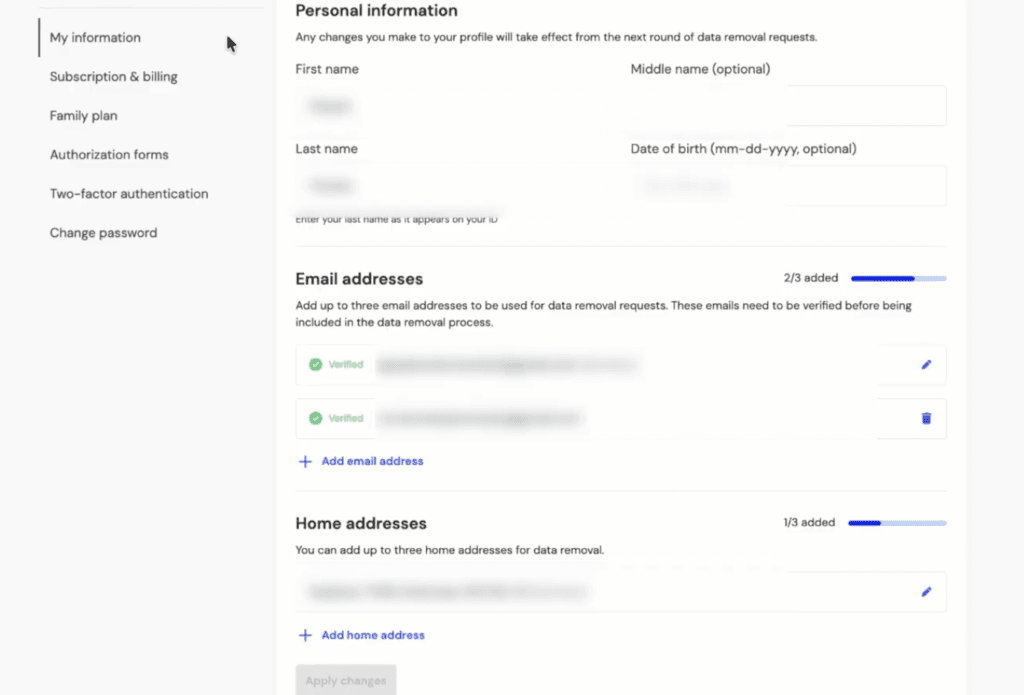
Step 3: Sign the authorization form
Next you sign a short authorization form — a limited power of attorney that lets Incogni contact data brokers and request removals for you. You type or draw your signature once. Without it, brokers can ignore the requests; with it, they’re legally obliged to respond. If you update your details later, you’ll be asked to re-sign before the next round goes out.
Step 4: Read your data-privacy dashboard
Once you’ve signed, Incogni starts firing requests automatically — you don’t do anything else. The dashboard is where you confirm it’s working: a removal-requests graph over time, plus counts for Completed, In Progress, Scheduled and Total sent, how many brokers actually held your data, and a running “time saved” figure.
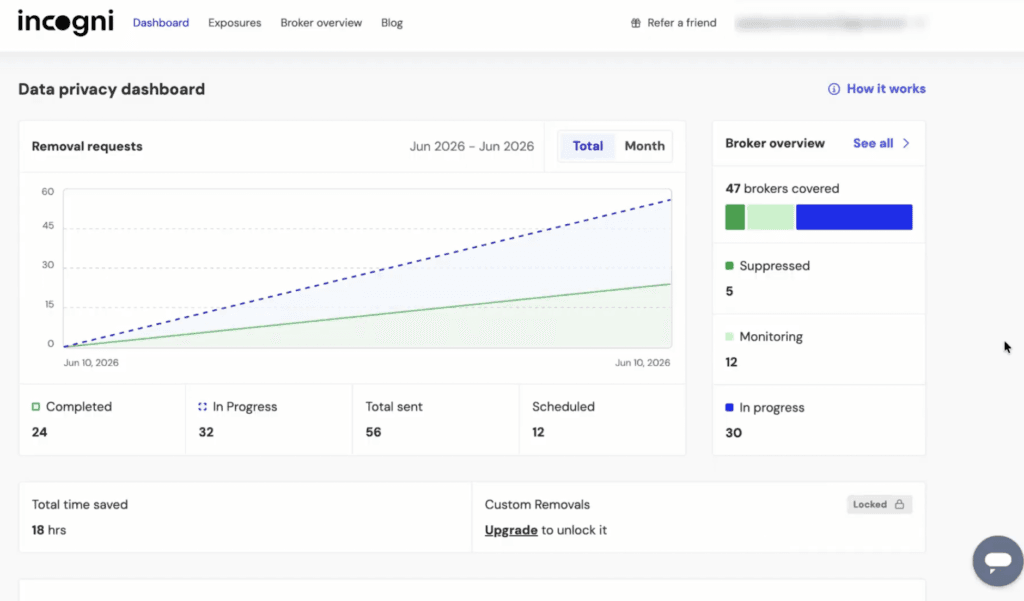
On the Standard plan, Custom Removals shows as Locked — that feature (removing data from sites outside the core broker list) is Unlimited-only. Everything else on the dashboard works on every plan.
Step 5: Check broker compliance and severity
This is the part most write-ups skip. The Broker compliance card sorts brokers into Compliant, Inconsistent, Resistant and Undetermined, and shows the average time to resolve a request. The notifications feed lists brokers as they confirm a removal.
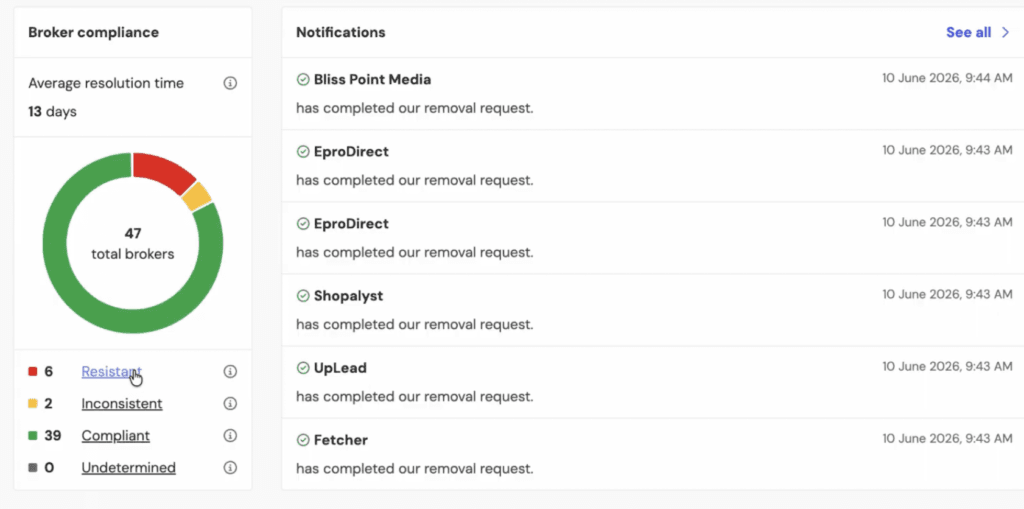
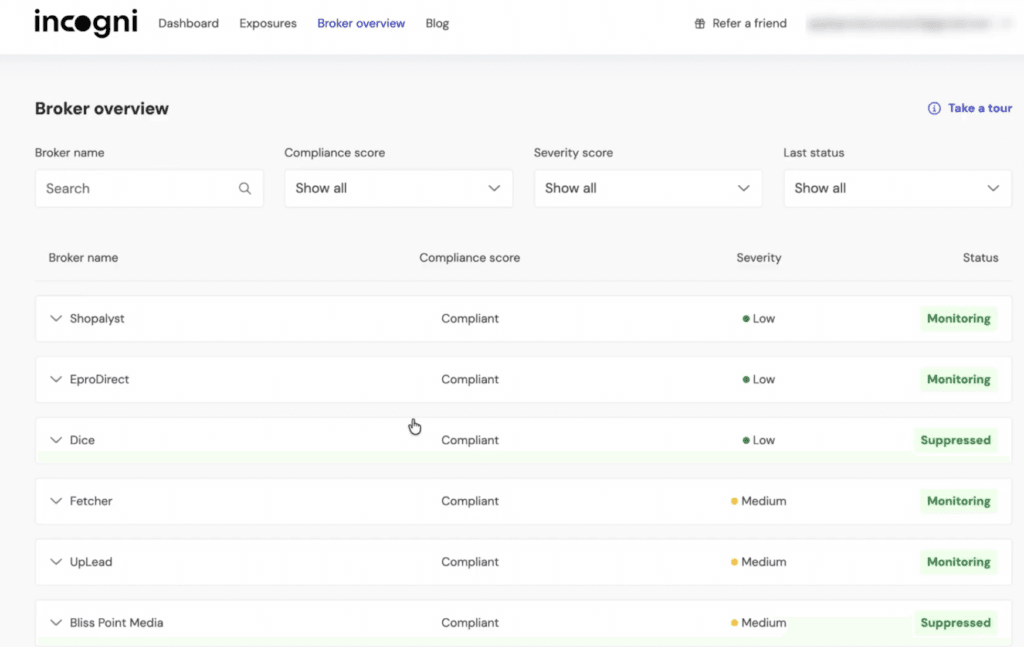
Open Broker overview for the detail: each broker gets a compliance score and a severity rating (Low, Medium or High, based on how sensitive the data it holds is), plus a status such as Monitoring or Suppressed. Suppressed is the one to like — it means the broker has agreed not to re-list you, not just delete you once.
How to tell Incogni is actually working
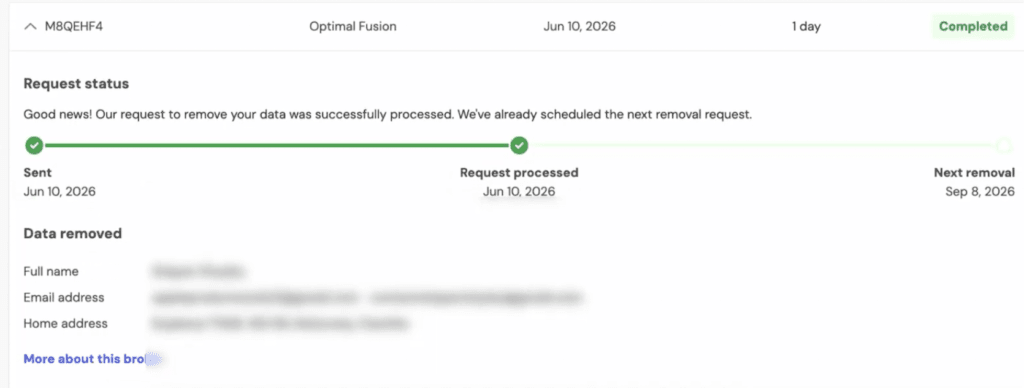
Open any request to see its full status: Sent, Processed, and the date of the next scheduled removal — because brokers re-collect data, Incogni keeps re-sending rather than removing you once. It also lists exactly which fields were removed (name, email, address). Don’t expect instant results: brokers have 30–45 days to comply by law, and some drag their feet, so the first removals usually land within a couple of weeks and the rest trickle in after.
Common mistakes and troubleshooting
- Paying monthly when you mean to stay. Monthly is roughly double the annual rate, and a single month often ends before brokers finish their 30–45 day window. Annual is the sensible default.
- The wave of confirmation emails. In the first month you’ll get a flood of opt-out confirmations from brokers. That’s normal — it’s your requests going out, not spam.
- Expecting it to remove everything. Incogni can’t touch public records, social-media posts, news articles or Google results directly. It handles data brokers and people-search sites.
- Custom removals greyed out. Those need the Unlimited plan. On Standard the option stays locked.
- Can’t cancel from the dashboard. If you bought Incogni through Surfshark or NordVPN, you manage and cancel it through that partner, not Incogni directly.
- The discount isn’t applying. Make sure you used the deal link and entered YTSTACK at checkout. The 60% is first-year pricing on annual plans.
What I found testing Incogni
Setup was the easy part — name, a couple of emails, one address, sign the form, done. Where Incogni won me over was the dashboard. Most of these tools just throw a number at you; this one gives every broker a compliance score and a severity rating, and flags the ones holding financial or health data so you can see where the real risk sits. On mine, most brokers came back Compliant with a roughly 13-day average resolution, which was quicker than I expected. The honest downside: for the first couple of weeks you get a steady drip of confirmation emails, and on the Standard plan the Custom Removals box stays locked. Neither is a dealbreaker. If I were telling a beginner one thing, it’s this — go in expecting weeks, not minutes. The setup is instant; the removals run on the brokers’ legal timelines, not yours.
Is Incogni worth setting up, and who it’s for
Incogni is worth setting up if you get constant spam calls and emails, you’ve been in a breach, you’ve been doxed, or you just want a smaller online footprint without spending hours on opt-out forms yourself. The Standard plan covers most people; go Unlimited only if your data is scattered across niche sites and you need custom removals. It’s not the right tool if you want credit monitoring, dark-web scanning or identity-theft insurance — that’s a different kind of product. But for affordable, broad, automated data removal, it does the job, and the dashboard actually shows you it’s happening.
Ready to clear your data off the broker sites?
Start the removals — currently up to 60% off the first year with code YTSTACK.
Frequently asked questions
Does Incogni have a free trial?
No. There’s no free trial, but every plan comes with a 30-day money-back guarantee, so you can try Incogni and request a full refund within 30 days if it’s not for you.
How long does Incogni take to remove your data?
Data brokers have around 30–45 days to comply by law. The first removals often land within a couple of weeks, and the rest follow over the weeks after — it isn’t instant.
Is Incogni safe to use?
Yes. Incogni is backed by privacy laws such as GDPR and CCPA, is SOC 2 Type II audited, encrypts your data, and had its removal process independently audited by Deloitte, which confirmed it doesn’t sell your data.
How do I cancel Incogni?
Turn off auto-renewal in your account settings. If you bought Incogni through Surfshark or NordVPN, cancel it through that partner instead. Cancelling stops renewal but doesn’t trigger a refund unless you’re inside the 30-day window.
Do I need a code for the Incogni discount?
Use the deal link and enter YTSTACK at checkout to get up to 60% off an annual plan. It’s first-year pricing, so it renews at the standard rate — note your renewal date.
Related next step
Next: browse more privacy tool guides, see how Incogni’s parent company stacks up in Surfshark vs ProtonVPN, or check the current software deals.