A CRM for architects has to track a project from the first inquiry to the signed proposal and into design. GoHighLevel does it in one sub-account: an inquiry form, a consultation calendar, a seven-stage project pipeline, proposals with e-signature and an automated follow-up. Here is the full setup, step by step. Build it on our 30-day GoHighLevel trial (14 days is standard).
GoHighLevel deal
Extended 30-day free trial (the standard is 14 days), plus the free GHL Launch Vault (20 bonuses, including a client-ready sales kit).
What you will build
| Piece | Where | Job |
|---|---|---|
| Sub-account | Agency view, Sub-accounts | Holds inquiries, consultations, proposals and projects |
| Project pipeline | Opportunities, Pipelines | Tracks each project from inquiry to completion |
| Inquiry form | Sites, Forms | Captures project type, budget and location |
| Consultation calendar | Calendars | Lets clients book a first meeting |
| Proposal | Payments, Documents & Contracts | Sends the proposal for e-signature |
| Follow-up workflow | Automation | Emails new inquiries and chases the ones that do not book |
Step 1: Create the sub-account
In the agency view, open Sub-accounts and click Create sub-account. Start blank, or search the templates for “architecture”: there are architecture firm templates. You can also use an existing sub-account.
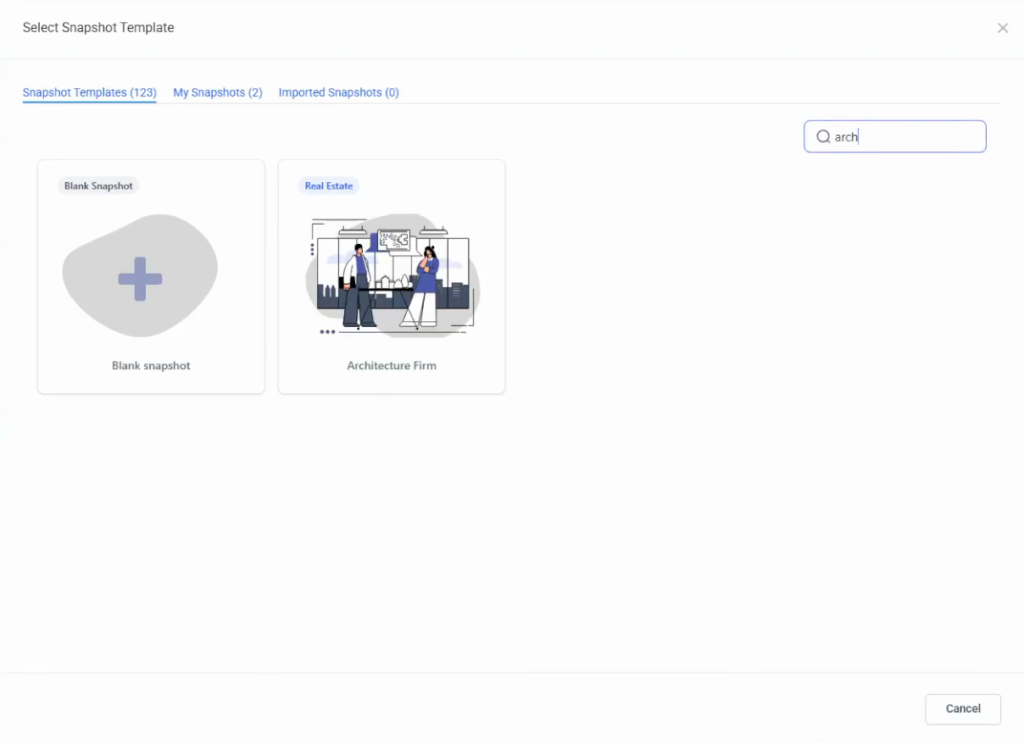
Then open Settings, Business Profile and fill in the business name, email, phone and address. Check the time zone, because the consultation calendar uses it.
Step 2: Build the project pipeline
Open Opportunities, then Pipelines at the top, and click Create pipeline. Name it Architecture pipeline and add seven stages:
- New inquiry
- Consultation scheduled
- Proposal sent
- Proposal signed
- In design
- Project complete
- Lost
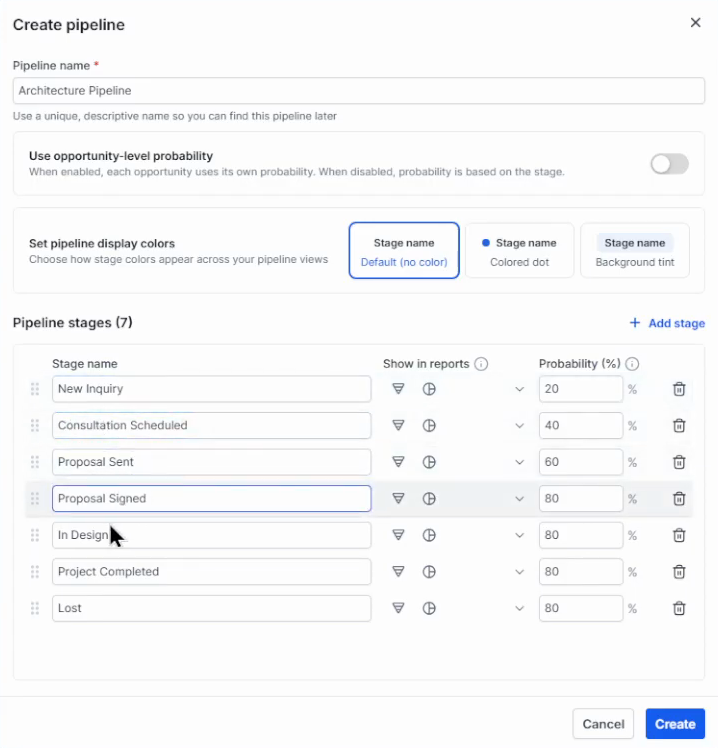
Save, then switch the Opportunities board to the new pipeline. The pipelines and opportunities guide covers the board in more detail.
Step 3: Create the project inquiry form
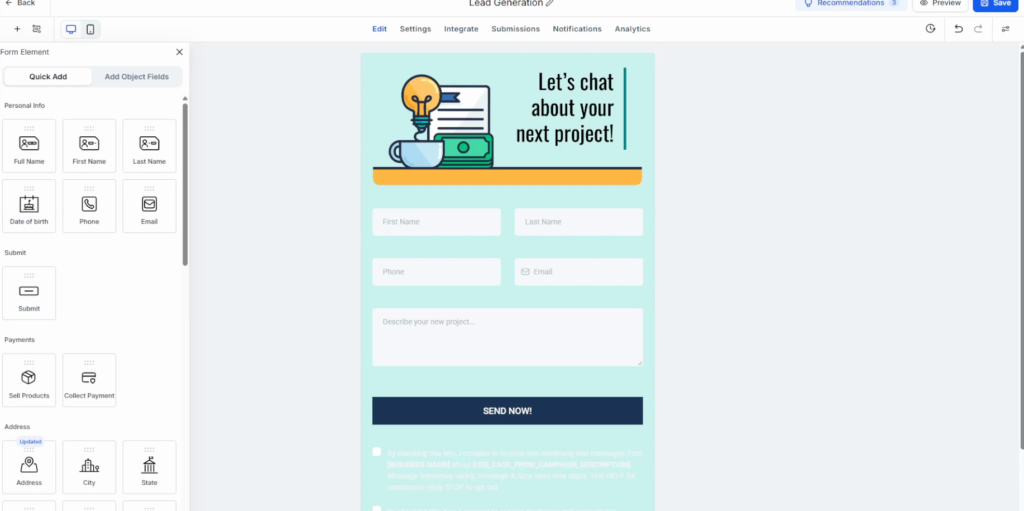
Open Sites, Forms and create a form from a template (search “project inquiry”) or from scratch. Useful fields:
- Full name, email and phone.
- Project type as options: new residential building, home renovation, commercial space, interior design.
- Estimated project budget.
- Project location.
- Project description.
Change the button text from “Send now” to “Request a consultation”, set a thank-you message in the form settings, then preview and save.
Step 4: Set up the consultation calendar
Open Calendars, Calendar settings, click Create new calendar and choose Personal booking. Name it, for example Architecture project consultation, assign the team member and set the meeting duration. The advanced settings cover visuals, staff, location, availability, booking rules and an optional deposit before the booking is confirmed.
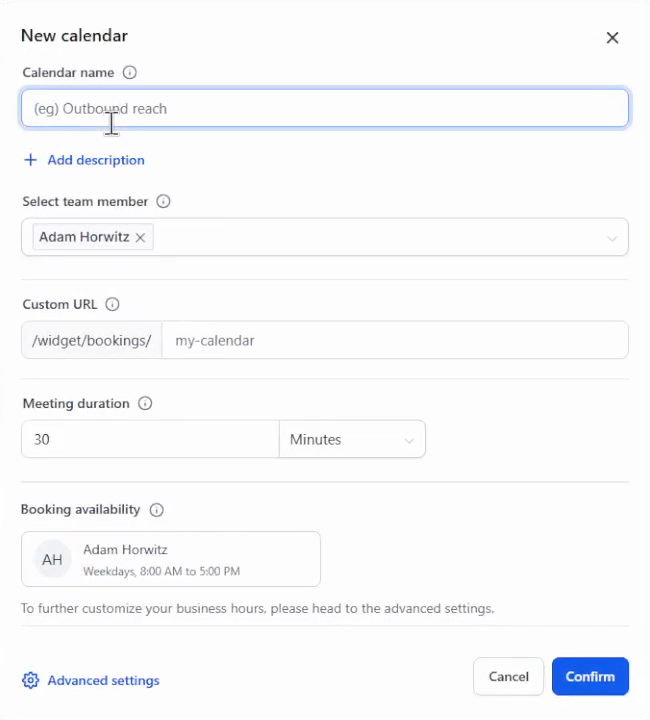
Put the form and the calendar on your website (Sites, Websites, then add the form or calendar element to a page), or send the calendar link after an inquiry comes in.
Step 5: Send proposals for e-signature
Open Payments, Documents & Contracts and create a new document, for example Residential renovation proposal. Select the contact, add the proposal details and terms, and put a signature field at the end. Preview it, save and click Send.
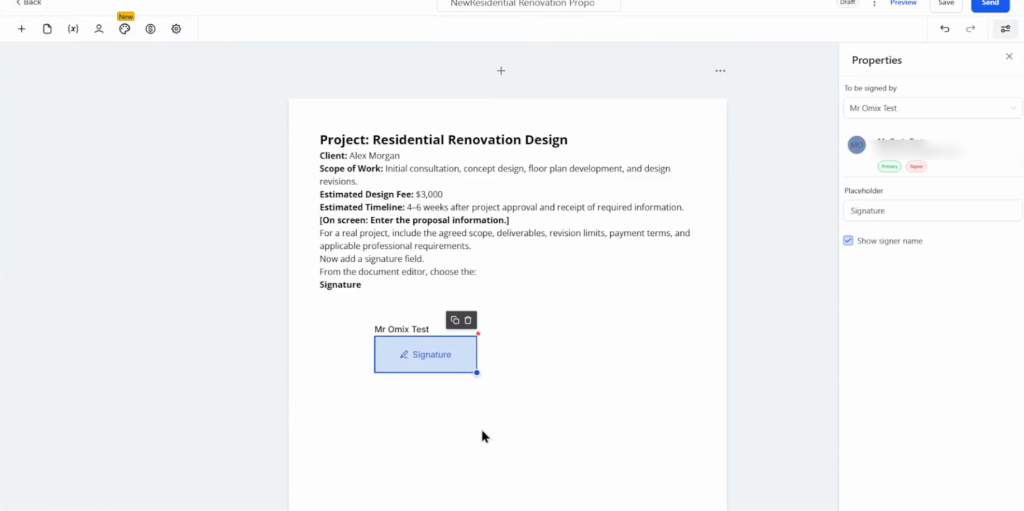
Once the client signs, the project moves to the next stage of the pipeline.
Step 6: Automate the follow-up
Open Automation and use Build with AI with a prompt such as “automate follow-ups for new project inquiries”. Review what it builds: the trigger must use the right inquiry form, and the opportunity must land in the right pipeline and stage. Ask the AI to fix anything that is off.
The workflow built in the video:
- Trigger: the project inquiry form is submitted.
- Add the tag “architecture lead”.
- Create or update the opportunity in the architecture pipeline.
- Send an “inquiry received” email.
- Wait 3 days.
- If no appointment is booked and the opportunity is still at New inquiry, send a follow-up email; otherwise stop.
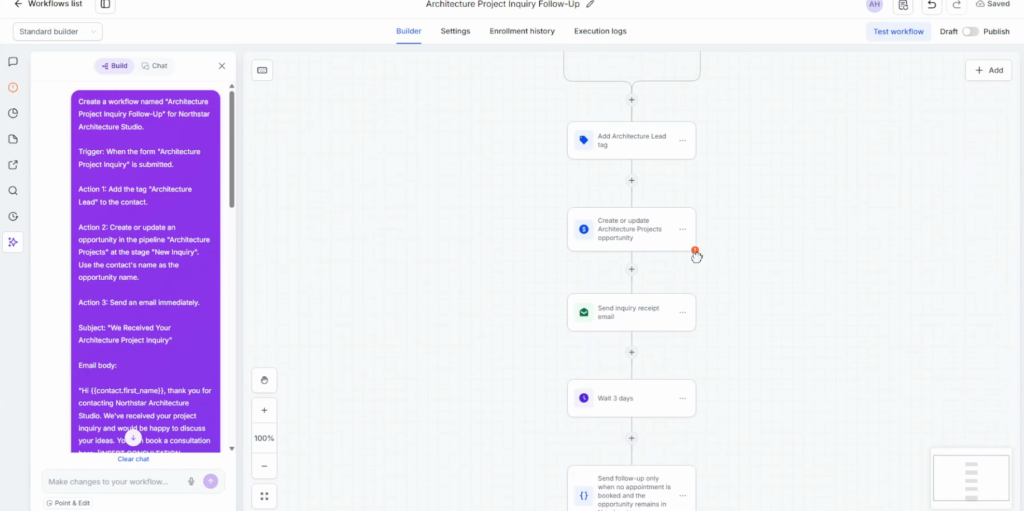
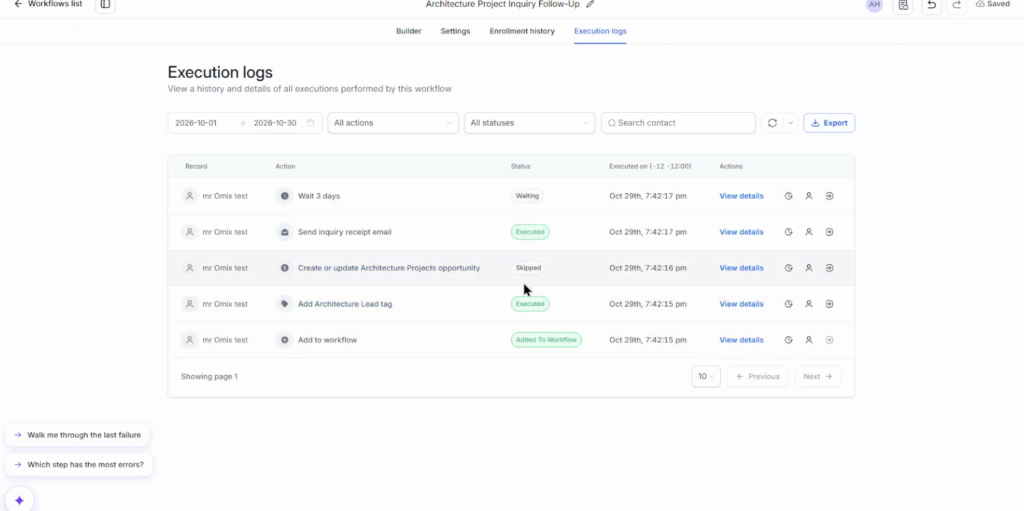
Click Test workflow, then Run test, and read the execution log: each step shows executed, skipped or waiting. Publish when it is right.
Step 7: Test it as a client
Fill in the form as a client, check that the contact appears, book a slot on the calendar and check that the automation runs.
What I would get right first
I would keep the pipeline to the seven stages above for the first month. The gap between the inquiry and the consultation is where an unanswered lead goes cold, so the 3-day follow-up is the part to get right before adding anything else.
Once it runs, save the sub-account as a GoHighLevel snapshot. If you set up CRMs for several studios, the next one takes minutes instead of an afternoon.
Build your firm’s CRM on a 30-day trial
30 days free instead of 14, plus the free GHL Launch Vault: 20 bonuses including a client-ready sales kit.
FAQ
Can GoHighLevel work as a CRM for architects?
Yes. One sub-account holds the inquiry form, a consultation calendar, a project pipeline from inquiry to completion, proposals with e-signature and automated follow-ups.
What pipeline stages should an architecture firm use?
New inquiry, Consultation scheduled, Proposal sent, Proposal signed, In design, Project complete and Lost.
Can clients sign proposals in GoHighLevel?
Yes. Documents & Contracts under Payments sends a proposal with a signature field for e-signature.
Can the consultation calendar take a deposit?
Yes. The calendar’s advanced settings can require a deposit before the booking is confirmed.
Is there an architecture template in GoHighLevel?
Yes. Search the templates for architecture when you create the sub-account.
How do I follow up on architecture inquiries automatically?
Build a workflow triggered by the inquiry form: send an email, wait three days, and send a follow-up if no consultation is booked.
Related next step
Add missed call text back so calls you miss still get an answer, and see every GoHighLevel feature for what else the sub-account can do. Trial details are on the 30-day trial page. For a hotel or guest house, see the hotel CRM setup.