Is NordVPN good for gaming? Yes — if you know what a VPN can and can’t do. It won’t halve your ping, but it hides gaming traffic from a throttling ISP, gives you a cleaner route to a distant game server, and shields your IP from DDoS attacks. Here’s where it helps, where it doesn’t, and how it held up when I tested it.
IN THIS GUIDE
When a gaming VPN actually helps (and when it won’t)
Let me be straight, because most reviews won’t be: a VPN does not magically reduce your ping. Your traffic still gets encrypted and routed through a server, and that can add a few milliseconds. So a gaming VPN earns its place in three specific situations.
1. Your ISP throttles gaming traffic. If your provider slows your connection when it spots heavy gaming, a VPN hides what you’re doing, so it has no reason to throttle you.
2. Your ISP routes you badly. If your provider takes a slow or messy path to the game server, connecting through a VPN server closer to that server can give you a shorter, more direct route — and lower ping.
3. You want your IP hidden. A VPN masks your real address, which protects you from DDoS attacks and lets you play on servers in other regions, join friends abroad, or jump on early releases.
So the real win is a more stable, safer connection with fewer random lag spikes — not a miracle. Keep that expectation and a VPN becomes a useful tool instead of a disappointment.
Why NordVPN is a strong gaming VPN
Out of the VPNs I tested for gaming, NordVPN is the one I’d hand to most people. It’s the fastest of the bunch, the server network is huge, and the extra features are the ones gamers actually use rather than marketing filler.
Speed and ping in testing
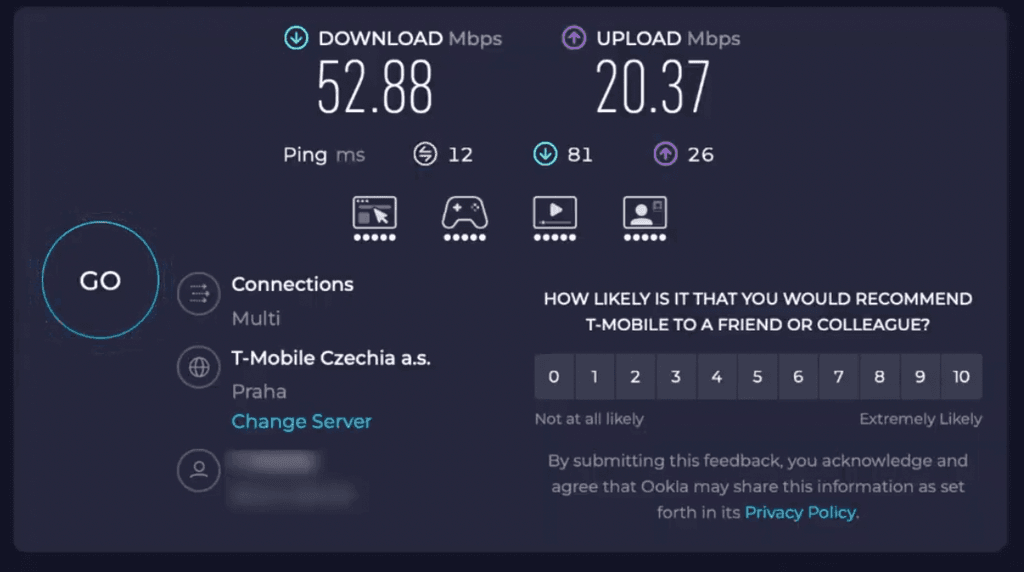
NordVPN runs on NordLynx, its own protocol built on WireGuard but tuned to be even quicker. In practice that means a tiny speed drop and low latency, which is exactly what you want for games. Here’s my baseline before connecting — about 52.9 Mbps down and a 13 ms ping:
And here’s a nearby server on NordLynx. Download barely moved, sitting around 52 Mbps:
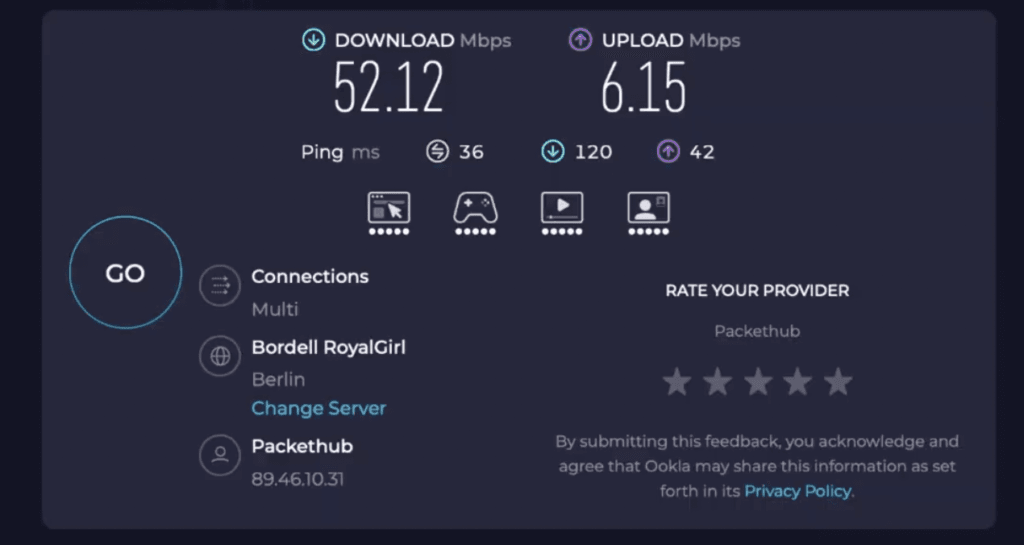
I didn’t capture a connected-ping figure on camera, so I won’t pretend to — but the thing that matters for smooth gameplay is that the speed held up. A VPN that keeps your throughput near baseline is a VPN that won’t introduce stutter. The reason that’s possible is the network: thousands of servers across 100+ countries, so there’s almost always one near the game server you’re trying to reach.
DDoS protection and playing privately
Because a VPN hides your real IP, the people you’re matched against can’t see it — which shuts down the most common form of harassment in competitive lobbies. A salty opponent can’t DDoS an address they can’t find. NordVPN also encrypts everything between you and the server, so your ISP and anyone on the same network can’t see what you’re playing or doing.
Meshnet: lag-free sessions with friends
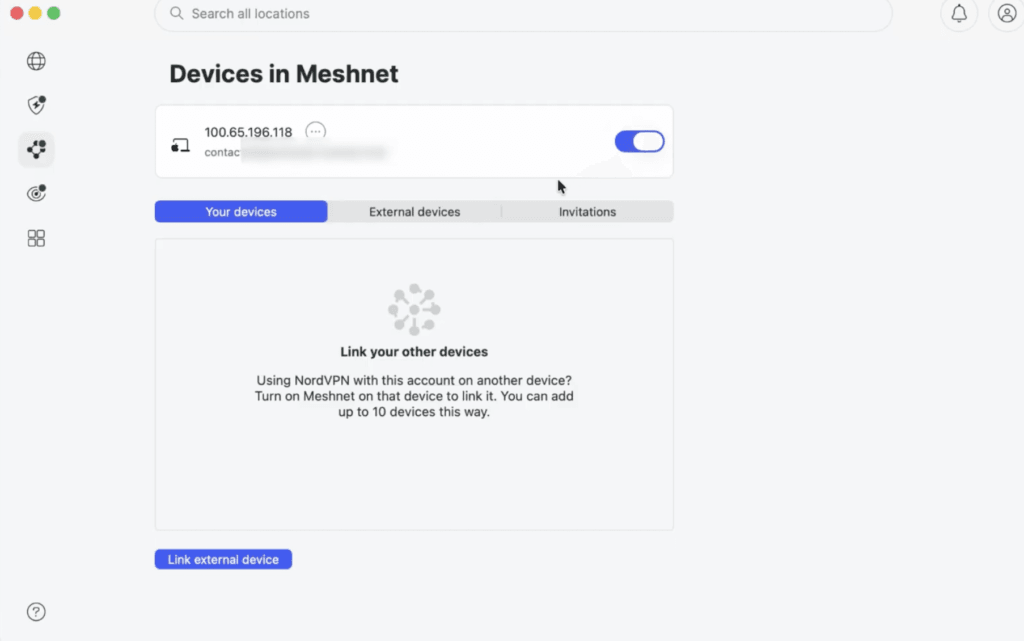
Meshnet is the feature I’d point gamers to first. It links your own devices — and your friends’ — into a private, encrypted network, with the option to route through each other’s connections. It’s the closest thing to a modern LAN party without everyone being in the same room, and it’s handy for hosting your own sessions.
How to set up NordVPN for the lowest ping
A VPN only helps your gaming if you set it up right. A few tips that actually move the needle:
- Connect to a server close to the game server, not just close to you. This is the one most people get wrong — the goal is a short path to where the match is hosted.
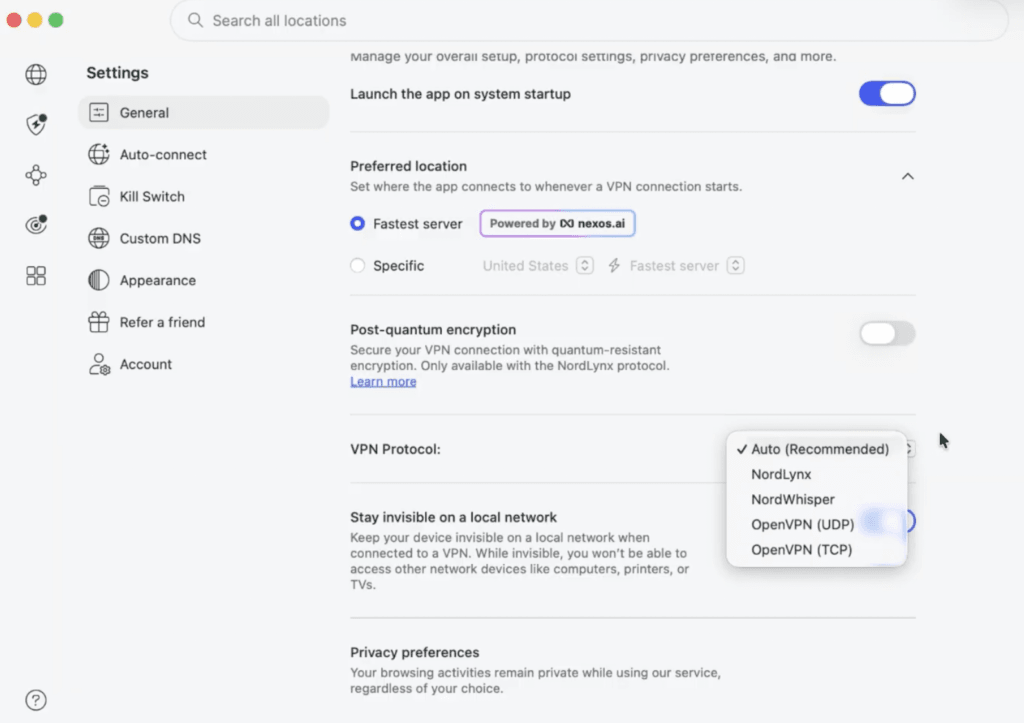
- Set your protocol to NordLynx for the fastest speeds. You’ll find it under Settings → VPN protocol.
- Plug in with an Ethernet cable instead of Wi-Fi where you can. A wired connection is far more stable, and stability matters more than raw speed for gaming.
- If a game’s anti-cheat keeps flagging you, use a static or dedicated IP so your address doesn’t keep changing mid-match.
One note on consoles: there’s no native NordVPN app for PlayStation or Xbox. To use it there, set NordVPN up on your router so it covers the whole network, or share a VPN-connected PC’s connection. It works — it’s just not one tap like it is on PC or mobile.
NordVPN for gaming: pros and cons
Pros
- Fastest in my testing thanks to NordLynx, with minimal speed drop
- Thousands of servers across 100+ countries, so one is usually near your game server
- Hides your IP to block DDoS attacks in competitive lobbies
- Meshnet for private, low-lag sessions with friends
- Works on PC, mobile, and consoles via a router
Cons
- Like any VPN, it can add a few milliseconds of ping
- It can’t fix a genuinely slow internet plan
- No native PlayStation or Xbox app — you’ll need a router setup
- No permanently free tier (there’s a money-back guarantee instead)
NordVPN pricing and the current gaming deal
NordVPN doesn’t have a free plan, but it’s backed by a 30-day money-back guarantee, so you can test it on your own games and refund if it doesn’t help. The per-month price drops a lot on longer plans, which is where the value is.
At the time of writing, the gaming deal through my link is up to 76% off plus 4 months free when you add the code YTSTACK at checkout. Discounts like this change, so check the current offer before you commit.
Get the NordVPN deal
A faster, more stable connection for gaming — plus DDoS protection and Meshnet for low-lag sessions with friends.
What I found testing NordVPN for gaming
After testing several VPN’s for gaming, including NordVPN, Surfshark, ProtonVPN, and several other free ones, I can with conviction say that NordVPN is the clear winner. Although it’s a bit on the expensive side, its servers were, from my experience, by far the fastest and the most predictable with the least outages. It has many customization options and was designed with gamers’ needs in mind. If you are on a budget, I’d recommend that you test the free ProtonVPN plan first, and if it’s not sufficient, go either for Nord or Surfshark. Both of these VPN’s have a 30-day money-back guarantee, so you can test them for 30 days basically risk-free.
NordVPN alternatives for gaming
NordVPN is my top pick, but two others are worth knowing about depending on what you need.
Surfshark is the value choice. It’s the only top-tier VPN with truly unlimited devices on one account, so you can cover your gaming PC, your PlayStation, your Xbox, your phone, and everyone else in the house at once. It runs on WireGuard for fast speeds and blocks ads and trackers in the background with CleanWeb. For a household full of gamers, nothing else comes close on price — currently up to 87% off plus 3 months free. Get the Surfshark deal →
ProtonVPN is the honest pick if you can’t pay. Its free plan gives you unlimited data, which is rare, but it limits you to servers in a handful of countries and locks the best features behind the paid plan (paid adds port forwarding, which helps with hosting). It’s a fine place to start, but for serious gaming a paid plan will always perform better. Try ProtonVPN →
If you’re torn between those two, I broke them down in detail in my Surfshark vs ProtonVPN guide.
So, is NordVPN good for gaming? My verdict
Yes — NordVPN is the best all-round VPN for gaming for most people. It’s the fastest I tested, it protects you from DDoS attacks, Meshnet is great for playing with friends, and the speed drop is small enough that you won’t feel it on a nearby server. Pick it if you want raw speed plus security on PC, mobile, or a console via your router, and especially if you play competitively and want your IP hidden.
The one situation where it won’t help: if your only problem is a slow internet plan, no VPN can fix that — you’ll want to upgrade your connection first.
Lock in the NordVPN gaming deal
Currently up to 76% off + 4 months free with code YTSTACK — check the current offer.
Frequently asked questions
Does NordVPN lower ping for gaming?
Sometimes. If your ISP throttles gaming traffic or routes you to the game server over a messy path, connecting through a nearby NordVPN server can give you a shorter route and lower ping. The rest of the time, expect it to add a few milliseconds rather than remove them — the real benefit is stability, not a lower number.
Does NordVPN protect against DDoS attacks?
Yes. NordVPN hides your real IP address behind its server, so other players can’t see or target it. Since a DDoS attack needs your IP to work, an attacker can’t take you offline mid-match.
Can I use NordVPN on PS5 or Xbox?
Not directly — there’s no native console app. You can still use it by installing NordVPN on your router so it covers the console, or by sharing a VPN-connected PC’s connection. Once it’s set up, the console is protected like any other device.
Will using NordVPN get me banned from games?
No. Changing your IP with a VPN isn’t against the rules as long as you’re not cheating. If a game’s anti-cheat flags your changing address, switch on a static or dedicated IP so it stays the same during your session.
Is NordVPN free for gaming?
No — there’s no permanent free tier. It does have a 30-day money-back guarantee, so you can test it for gaming and get a refund if it doesn’t help, and there’s currently a deal with code YTSTACK for new sign-ups.
Related next step
Next: browse more VPN reviews, see how the value picks compare in Surfshark vs ProtonVPN, or check the current offers on the deals page.