To white label GoHighLevel, switch to Agency View → Settings → Company → White Label, upload your agency logo, connect a branded login subdomain with a CNAME record, add your privacy and terms URLs, and set up the white-label desktop app. Your clients then log in at app.yourdomain.com and see your brand, not HighLevel’s. Through our link you get a 30-day free trial instead of the usual 14 days to set it up before you pay.
GoHighLevel deal
Extended 30-day free trial (the standard is 14 days), plus the free GHL Launch Vault (20 bonuses, including a client-ready sales kit).
Before you start
- An agency account (white labeling lives in the agency view, not a sub-account).
- Your logo, ideally about 350 × 180 px and no larger than 2.5 MB, in the same colours as your website.
- A domain you own, plus access to its DNS settings (GoDaddy, Namecheap or wherever it is managed).
- Your privacy policy and terms and conditions URLs.
Step 1: Open the white label settings
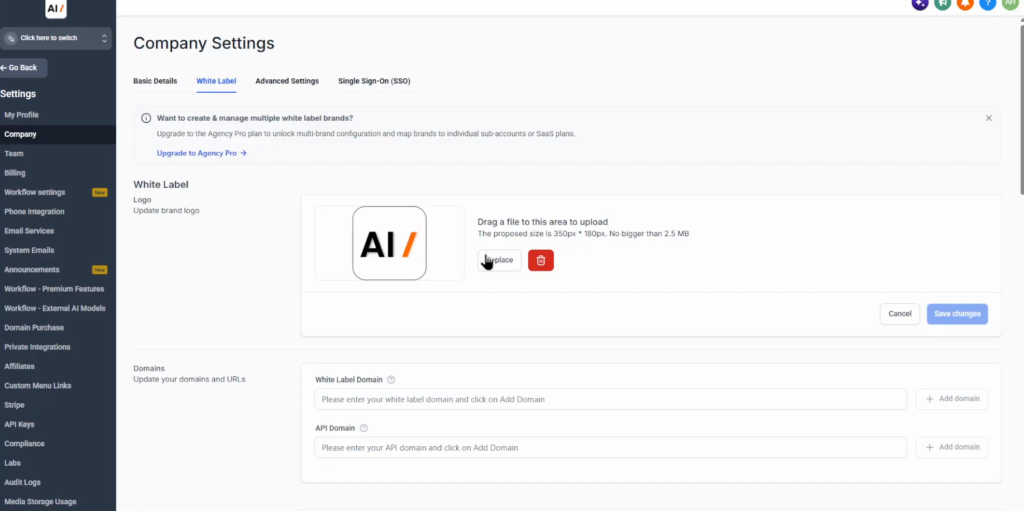
Make sure you are in the agency view: click the account switcher at the top left and choose Switch to Agency View. Then open Settings at the bottom of the left menu, click Company, and open the White Label tab. This is where all of the agency branding lives.
Step 2: Upload your agency logo
Upload your logo in the White Label section. GoHighLevel suggests about 350 × 180 pixels and a maximum of 2.5 MB. Use the same logo and colours as your agency website so the platform feels consistent to clients. You can replace or delete it at any time.
Step 3: Connect your white label domain
This replaces the normal HighLevel login address with your own: instead of app.gohighlevel.com, clients log in at something like app.yourdomain.com. Only subdomains are allowed, so you cannot use the bare domain.
- In the Domains section, enter your subdomain under White Label Domain and click Add domain.
- If GoHighLevel cannot connect it automatically, choose to set it up manually. It shows a CNAME record with the host (for example app) and the required value.
- Copy the record into the DNS settings at the company where your domain is managed.
- Come back and click Verify records. There is a help video in the dialog if you get stuck.
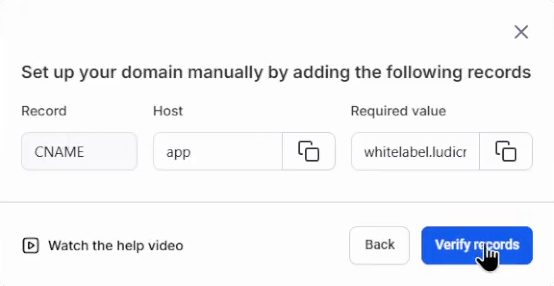
DNS changes can take a little while to propagate, so if verification fails right away, wait and try again.
Step 4: Add your policies
In the Policies section, enter your privacy policy URL and your terms and conditions URL. Clients see these on your branded login, so link your own agency pages.
Step 5: Set up the white-label desktop app
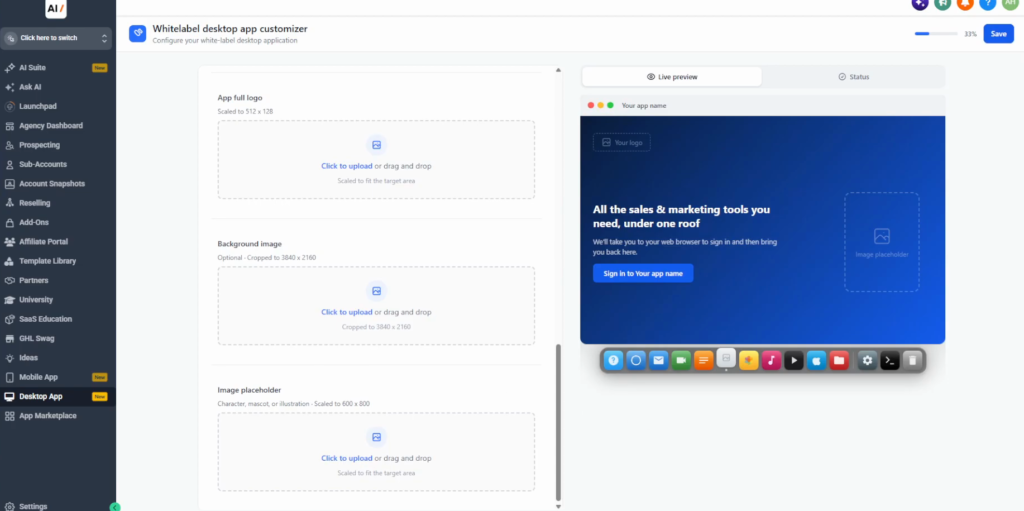
Go back and open Desktop App. Add your app name, app icon, a full logo, a background image and an image placeholder; the live preview on the right shows how the app will look. Click Save. Supported browsers then offer your white-labelled platform as an installed desktop web app with your agency name and icon, instead of a generic browser tab.
Step 6: Test it as a client
Open your white-label domain in a new browser window (or a private window) and check that the correct logo and branding appear on the login screen. If you set up the desktop app, install it and check it too. Fix anything that still says HighLevel before you invite clients.
Which GoHighLevel plan do you need for white label?
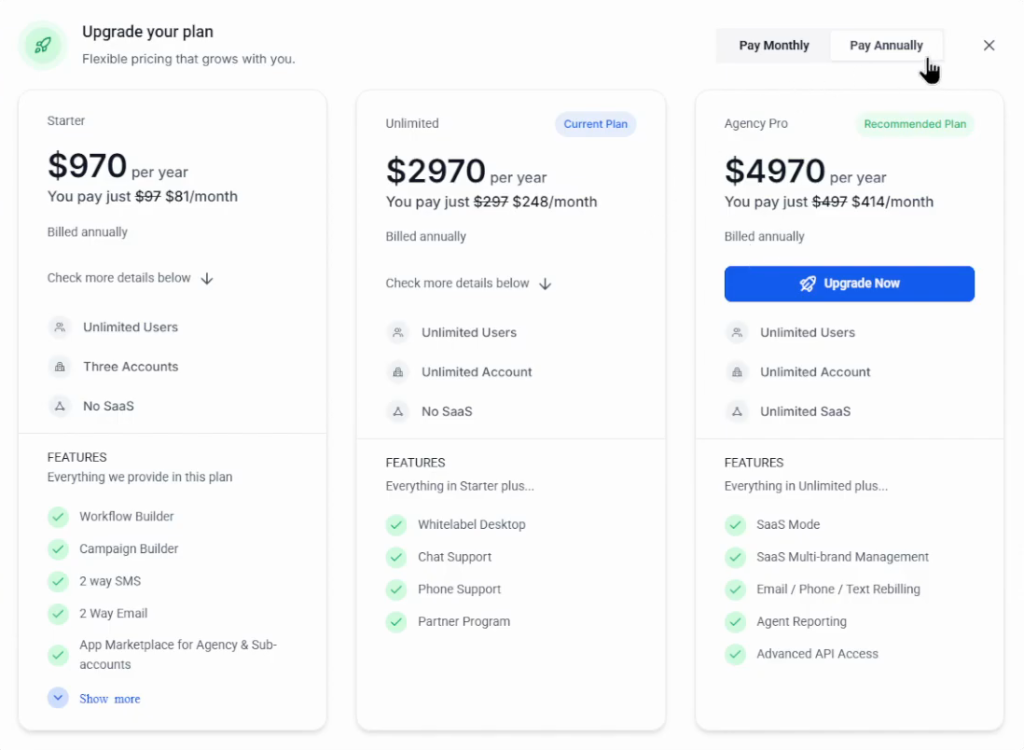
| Plan | Monthly | Annual | White label notes |
|---|---|---|---|
| Starter | $97 | $970 | Up to 3 sub-accounts |
| Unlimited | $297 | $2,970 | Unlimited sub-accounts; the white-label desktop app is listed in the plan features |
| Agency Pro ($497 tier) | $497 | $4,970 | SaaS mode, multi-brand white labeling, rebilling with markup |
Prices from HighLevel’s pricing page (November 2026), where the $497 tier is listed as Pro / Founder; the upgrade dialog in the video calls it Agency Pro. If you want to create and manage multiple white-label brands, mapped to individual sub-accounts or SaaS plans, GoHighLevel asks you to upgrade to Agency Pro. A white-label mobile app is a separate add-on ($497 a month on the pricing page). Paying yearly is cheaper.
Why I set this up first
White labeling is what turns GoHighLevel from a tool you use into a product you sell. When a client logs in at your domain and sees your logo, they are buying your agency, not HighLevel.
It takes about ten minutes, most of it waiting for DNS. Do it during the trial, before your first client onboards, so they never see the HighLevel brand at all.
Common mistakes
- Using the bare domain. Only subdomains such as app.yourdomain.com are allowed.
- Adding the record in the wrong place. The CNAME goes in the DNS of whoever manages your domain, not in GoHighLevel.
- Clicking verify too early. DNS can take time to update; wait and retry.
- Skipping the test. Always check the login in a fresh browser window before sending it to a client.
- Expecting multi-brand on Unlimited. Several separate white-label brands need Agency Pro.
Start your 30-day GoHighLevel trial
30 days free instead of 14, plus the free GHL Launch Vault: 20 bonuses including a client-ready sales kit.
FAQ
Can you white label GoHighLevel?
Yes. In the agency view go to Settings, Company, White Label: upload your logo, connect a branded login subdomain, add your policies and set up the white-label desktop app. Clients then see your brand when they log in.
Which GoHighLevel plan includes white label?
Agency branding and the white-label desktop app are part of the agency settings, and the desktop app is listed with the Unlimited plan ($297 a month). Multi-brand white labeling and SaaS mode need the $497 Agency Pro tier. The white-label mobile app is a paid add-on.
What domain do I use for GoHighLevel white label?
A subdomain you own, such as app.yourdomain.com. You add a CNAME record at your domain provider and verify it in GoHighLevel.
What size should my GoHighLevel white label logo be?
About 350 × 180 pixels and no larger than 2.5 MB.
Is the GoHighLevel mobile app white label?
Not by default. A white-label mobile app is a separate add-on, listed at $497 a month on HighLevel’s pricing page (November 2026).
How long is the GoHighLevel free trial?
The standard trial is 14 days; through our link you get 30 days, and you are not charged during the trial.
Related next step
Once your branding is live, set up the client side: the GoHighLevel CRM tutorial, pipelines and opportunities and your first funnel. The trial and bonus details are on the 30-day trial page. Want replies and bookings handled automatically? Set up the GoHighLevel AI Employee. To resell the platform as your own software, set up GoHighLevel SaaS mode.